
How to Access Digital Banking
Welcome former Astera members
- Online Banking
- Mobile Banking App
- Card Controls & more

All Access Through Adventure
Astera has been migrated to Adventure's Digital Banking
While your digital banking experience hasn't changed much, the way you access it has. Please use your same username and password to access Online Banking and Mobile Banking through Adventure CU.
What do I need to do?
- Access Online Banking from Adventurecu.org
- Asteracu.com will no longer be available
- Download and use the Adventure CU mobile banking app
- The Astera app will no longer work
What's staying the same?
- Your username and password will not change
- Your account history will carry over
- Your eStatements will carry over
- Your Bill Pay payees, history, and settings will carry over
New Features
- Free Credit Monitoring
- Daily credit score updates
- Budgeting & goal setting tools
- Edge Checking dashboard
- Security Center
Now - Nov. 10, 2025:
- Astera members should continue using the Astera Card Controls app or website until November 10, 2025.
- After Nov. 10th, the Astera Card Controls app and website will no longer work. You can safely delete the app from your device(s) and delete the website from your bookmarks.
- On Tuesday, Nov. 11, 2025, you can access the Adventure version of Card Controls.
- Download the Adventure Card Controls app from the Apple App Store or the Google Play Store.
- Access the Adventure Card Controls site via digital banking. After logging in, select "More Services" from the menu.
- You must register as a new user. If desired, you should be able to use the same username and password as before.
- You will have to reconfigure the app by adding your card(s), setting up transaction alerts, and setting up transaction blocks.
Making A Credit Card Payment:
To pay your Astera credit card, please use one of these options:
- If you are registered with Astera's Card Controls app or website, you will be able to process payments until Nov. 10th.
- On/after Nov. 11th, you can register for Adventure's version of Card Controls to make a payment.
- Contact Adventure Credit Union directly to process a payment:
- Chat via Adventurecu.org
- Send a secure message within digital banking
- Call or text 800.323.2129
Please be aware that Adventure processes Bill Pay payments differently than Astera did. When you schedule a payment in Bill Pay, Adventure Credit Union will deduct the funds from your checking account on the "Send on" date, not the "estimated delivery" date.
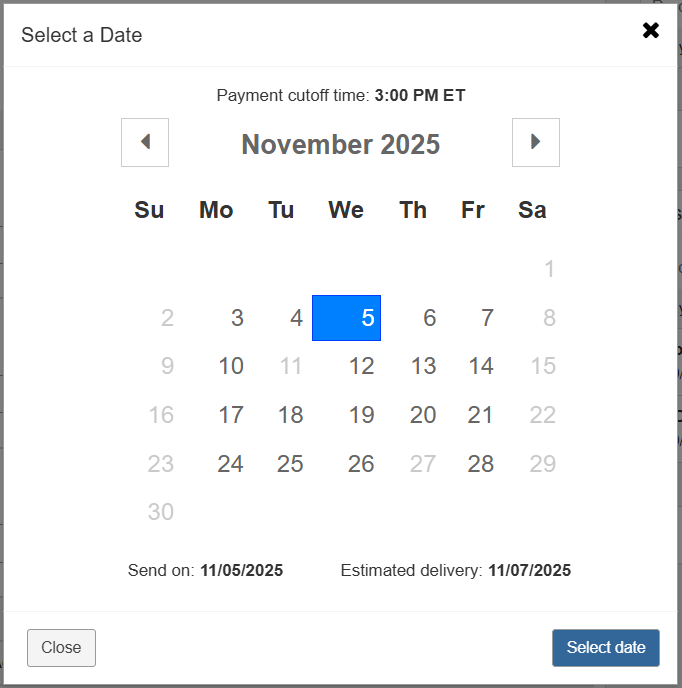
For example: On November 1st, if you schedule your water bill payment to "send on" November 5th, the funds must be available in your checking account on November 5th for this payment to clear.
How is this different?
In Astera's Bill Pay system, funds would not be deducted from your checking account until the payee actually received the payment.
Important: Members who had established a Quicken or QuickBooks connection with Online Banking prior to Nov. 1, 2025 will need to re-establish a new connection. Please download the appropriate guide for instructions.
- QuickBooks Online Conversion Instructions
- QuickBooks Desktop Conversion Instructions
- Quicken Conversion Instructions
For information about connecting your Adventure digital banking account with an Intuit product for the first time, please visit this page.